Payment Processing for Restaurants: Compare Fees, Terms, and Options
Compare payment processing for restaurants: understand fees, pricing models, contract terms, POS compatibility, and checkout options to choose the right fit.
Published
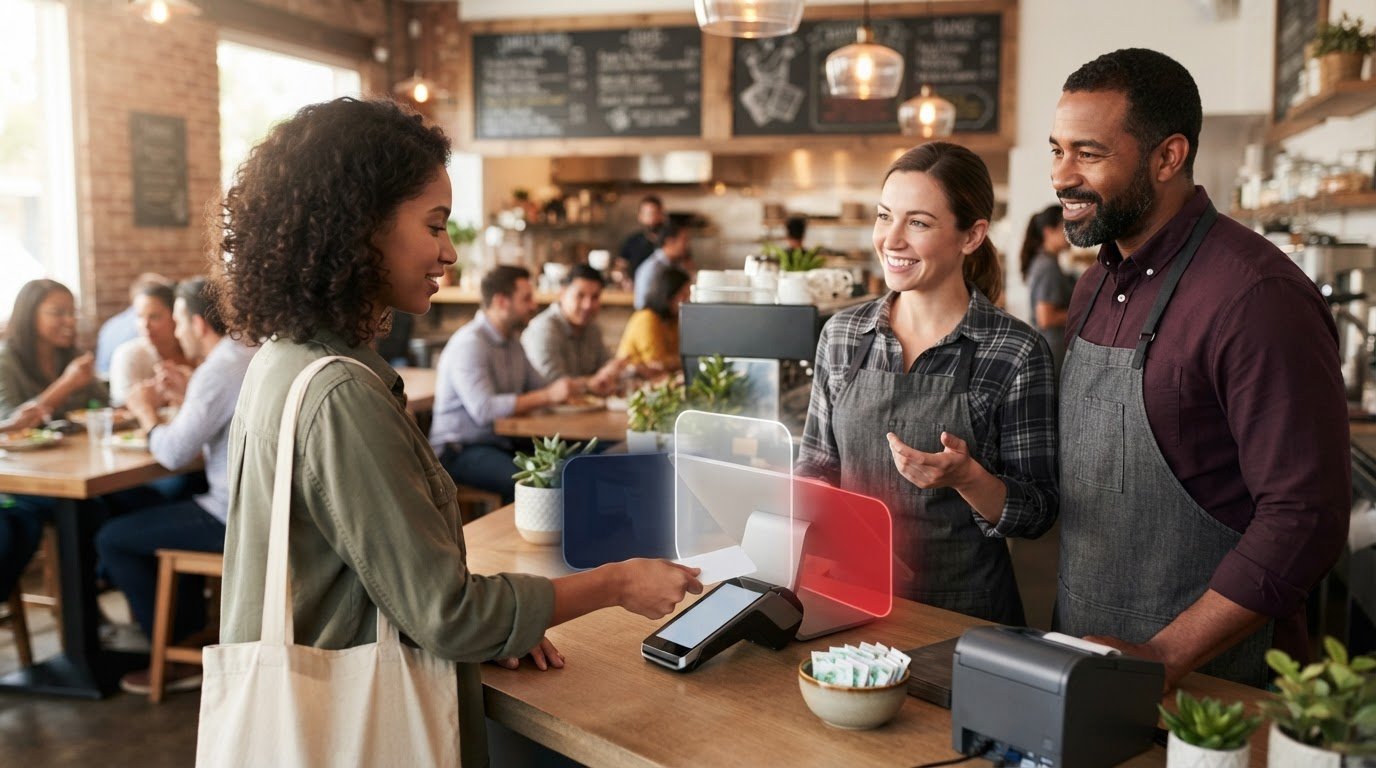
Restaurant card payments move through a processor before the money reaches the business. Payment processing for restaurants includes confirming card details, routing the transaction for authorization, and depositing approved funds into the restaurant’s merchant account, usually within a few days and after processing fees are deducted. The processor also supplies payment terminals and other hardware for accepting payments.
That sounds straightforward. The costs and terms often aren’t. Pricing can depend on the payment model, transaction type, and sales volume, while contract terms can affect early exit costs, equipment replacement, and support.
This guide explains how restaurant payment processing works, how fees are calculated, and how flat-rate, tiered, and interchange-plus pricing compare. It also covers practical considerations at a quick-service counter, including checkout flow, payment methods, POS compatibility, equipment, and cancellation terms. Use these criteria to compare options against the way your restaurant serves customers.
Key Takeaways
- Compare the full contract, including exit penalties, equipment replacement terms, and the support you’ll receive.
- Look beyond the advertised rate: interchange-plus and flat-rate pricing handle transaction costs differently.
- Protect payment data by choosing a processor that handles security requirements and supports secure transactions.
- For quick service, prioritize checkout speed, POS compatibility, payment options, and a clear plan for internet outages.
Table of Contents
Contracts and equipment leasing pitfalls
A low rate may not be the best fit if cancellation terms or equipment obligations restrict your plans. Before choosing a processor, review the pricing details, cancellation terms, equipment responsibilities, and support arrangements.
Contract Flexibility and Cancellation
An agreement with flexible cancellation terms differs from a fixed-term commitment. Read the cancellation clause for any notice requirements, early termination penalties, and equipment obligations that continue after service ends. Compare those terms with your plans. For example, moving locations or adopting a new ordering system can make a long commitment harder to manage.
Contract Fees and Customer Support
Contract costs cover more than transaction processing fees. Check for recurring account charges and any separate costs described in the agreement. Then identify how support works: which issues it handles, how to reach the team, and whether help is available around the clock. A restaurant processor should ideally provide 24/7 customer support. Clear terms matter most during a service disruption, when payment problems can interrupt ordering and revenue.
Review equipment terms just as carefully. For leased terminals, understand the lease period, return process, and responsibility for damaged or replacement equipment. For purchased hardware, check the replacement terms. Match devices to your service style: a counter-service restaurant may need a fixed terminal, while table service may benefit from handheld devices.
| Option | Commitment and cancellation | Hardware terms | Fees and support |
|---|---|---|---|
| Flexible agreement | Review notice and exit steps | Check return or replacement duties | Compare recurring charges and support access |
| Fixed-term agreement | Look for early termination penalties | Confirm duties through the term | Read fees and support terms for the full commitment |
| Leased equipment | Check whether the lease ends with processing | Review return, damage, and replacement terms | Identify separate lease charges |
Choose an agreement whose cancellation, equipment, and support terms suit your operating plans, rather than relying on the advertised rate alone.
How are restaurant transaction fees determined?
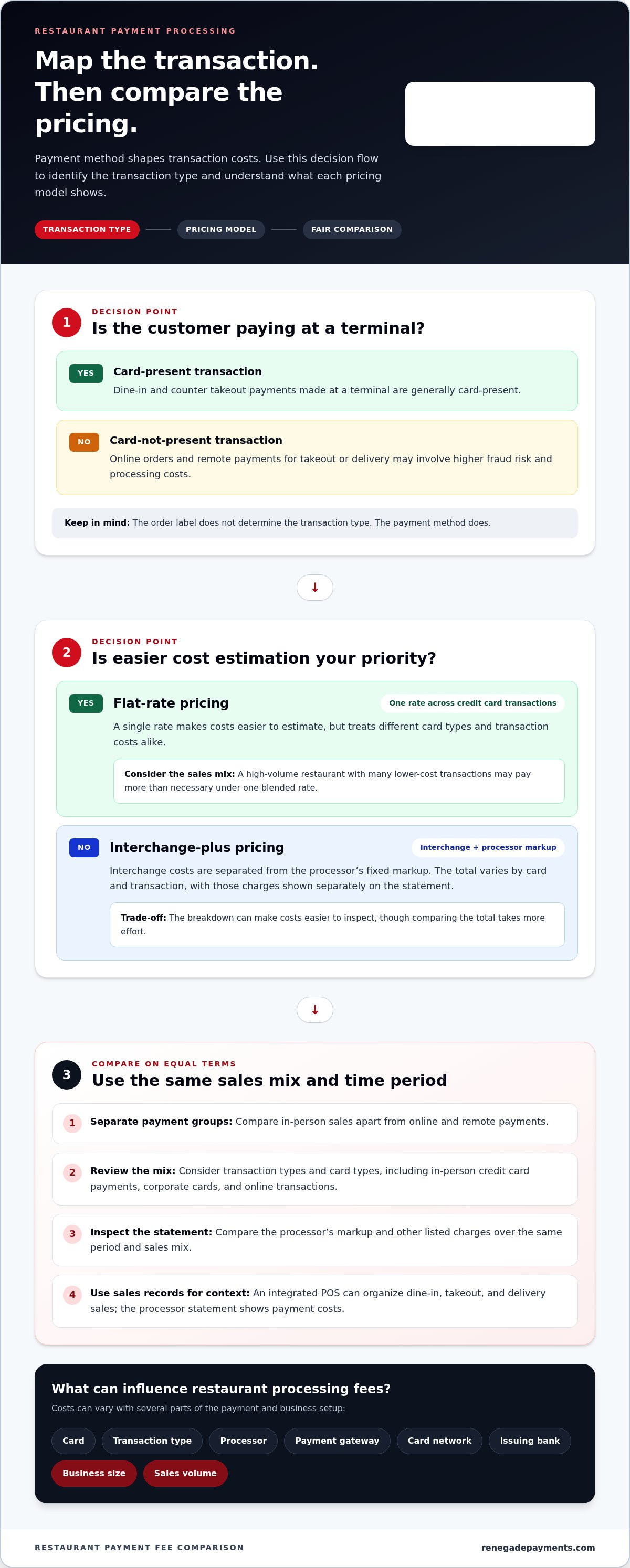
Fees vary with the card, transaction type, processor, payment gateway, card network, issuing bank, business size, and sales volume. Dine-in and counter takeout payments are generally card-present when customers pay at a terminal. Online and delivery orders may be card-not-present, which can involve higher fraud risk and processing costs.
Flat-Rate Pricing
Flat-rate pricing applies one rate across credit card transactions. This makes costs easier to estimate, but treats different card types and transaction costs alike. A restaurant with high volume and many lower-cost transactions may pay more than necessary under a single blended rate.
Interchange-Plus Pricing
Interchange-plus pricing separates interchange costs from the processor’s fixed markup. The total varies with the card and transaction, and the statement shows the interchange and processor charges separately. That can make costs easier to inspect than a blended rate, though comparing the total takes more effort.
Review statement charges by transaction type, not just by the headline rate. An in-person credit card payment may have different underlying costs from a corporate card or online transaction. Compare the processor’s markup and other listed charges over the same period and sales mix.
Fees by Order Type
The order label does not determine the transaction type; the payment method does. A dine-in guest tapping a card at the terminal makes a card-present payment. A takeout customer paying online or a delivery customer paying remotely makes a card-not-present payment. These transactions may involve higher fraud risk and fees than card-present payments.
For a fair comparison, separate in-person sales from online and remote payments. Then compare each group’s transaction mix, card types, and processing costs. An integrated POS system can help organize sales by dine-in, takeout, and delivery, while the processor’s statement shows payment costs. A clearer interchange breakdown can help you assess whether interchange-plus pricing fits your restaurant’s sales mix.
What is a restaurant payment processor?
A restaurant payment processor routes card transactions between the merchant, card network, and issuing bank. It works with the POS system to accept payments and move approved transactions toward settlement.
PCI Compliance and Encryption
PCI DSS compliance matters whenever a processor handles customer payment information. The Payment Card Industry Data Security Standard sets requirements for protecting card data. Encryption helps make payment information unreadable to unauthorized parties as it moves through a payment system. These safeguards protect data, while fraud prevention addresses suspicious transactions and disputes.
Set clear security routines. Keep payment information within the processor’s protected payment flow, limit staff access to payment records, and review account activity regularly. For example, a manager can compare a disputed transaction with the restaurant’s order record. Dispute management tools and chargeback support can help organize a response when a cardholder challenges a charge.
POS and Processor Integration
A POS system and processor work well together when they exchange transaction details reliably and support the restaurant’s payment methods. The right POS depends on the restaurant’s ordering flow, existing platform, and devices. Before adopting a setup, map how an order moves from entry to payment and into sales reporting.
For example, a counter-service restaurant may use a POS terminal for in-person card payments and an online ordering platform for remote transactions. Contactless payments, including mobile wallets such as Apple Pay, can also shape the checkout experience. Confirm how each payment method is handled and whether transactions appear correctly in the POS records.
Keep operational checks practical. Test a sale, refund, and daily closeout across the integrated POS and payment platform. Review statements and reports regularly for mismatched totals or missing transactions. Understand the procedure for an internet outage, since it affects whether staff can continue taking orders and payments. Choose an integrated setup that matches the restaurant’s workflow, not just a feature list.
Payment processing for quick-service restaurants
In quick service, payment friction appears at the counter. Choose a setup that moves customers from ordering to payment without slowing the line, while supporting counter sales, mobile orders, and the payment methods guests use.
A card transaction follows a defined route: the processor verifies card information, forwards it through the card network, and requests authorization from the issuing bank. After approval, funds are settled to the restaurant’s merchant account, less processing fees. For online orders, a payment gateway connects the checkout to this transaction flow.
Speed matters at checkout. Restaurant payment terminals should process payments in a couple of seconds or less to keep service moving. Test the full routine: staff enters an order, the customer taps or inserts a credit card, and the POS records the payment. Mobile wallets and other contactless methods can each create a different customer interaction, so rehearse the steps staff will use.
Match devices to each ordering channel. A counter terminal handles in-person sales, while handheld POS devices support tableside ordering and payment. Kiosks and QR-code payments offer other ways for customers to place and pay for orders. If the restaurant sells gift cards, confirm that its POS can issue, accept, and track them.
- Confirm the POS connects with the payment processor and supports your current ordering flow.
- Understand how transactions work during an internet outage before service depends on them.
- Review reporting by dine-in, takeout, delivery, and payment type to see where sales land.
Check contracts for hardware replacement terms and any additional setup fees. A quick-service restaurant needs the right mix of speed, devices, and reporting, not a feature list built for another operation. Compare your restaurant’s processing options against the way customers order and pay.
Choose a POS that integrates with its payment processor and supports counter, mobile, and other ordering channels. The setup should accept the payment methods customers use and provide reports by order type and payment type.
Renegade Payments: Dual Pricing
Renegade Payments helps restaurants address card processing costs with Dual Pricing at checkout. This option presents customers with the applicable payment prices before they pay, giving the restaurant a way to offset credit card processing fees. Clear checkout communication matters: customers should understand the prices before completing a transaction.
For a closer look at current costs, Renegade Payments offers a Free Savings Analysis of merchant processing statements. It identifies processing costs and helps uncover charges that may be difficult to spot. Restaurants seeking a transparent pricing structure can also use Interchange-Plus, which separates interchange costs from the processor’s fixed markup.
Consider these options when you want to review your statement, understand in-person checkout pricing, or see processing charges more clearly. Contact Renegade Payments to discuss the approach that fits your restaurant.
Make your next processing decision with clarity
Your restaurant’s payment setup should keep pace with changes in the business. A new ordering channel, a shift in service style, or a different checkout routine can change what your team needs from its processor. Revisit the fit when operations change, and review the terms and costs rather than guessing at the impact.
Make the next step practical: identify what has changed, note where payment friction occurs, and decide which costs or terms need clarity. That gives you a stronger basis for evaluating payment processing for restaurants and choosing an approach that supports the way your team serves customers.
Renegade Payments can help you take that next look. Contact Renegade Payments to discuss your options, and move forward with a decision grounded in your restaurant’s needs.
Frequently Asked Questions
How does payment processing work for restaurants?
Payment processing for restaurants begins when the POS sends a transaction for authorization, then approved sales are settled to the merchant account. An open tab adds a step: the restaurant can pre-authorize a card, keep the tab active, and collect the final amount after service. Staff should close the tab against the final bill and resolve unmatched authorizations during daily reconciliation.
What are the typical restaurant credit card processing fees in the U.S.?
There is no single typical U.S. restaurant card fee. Costs vary with the pricing model, card type, transaction channel, processor markup, and sales volume. An in-person tap and an online order can have different underlying costs. To estimate your effective rate, divide total processing charges by card sales for the same statement period, then compare equivalent periods and order channels.
How do restaurant payment processors compare on rates, features, and contract terms?
Compare processors by pricing structure, POS compatibility, payment channels, and cancellation terms. A restaurant that often changes its menu or service setup may value flexible cancellation and clear equipment terms. A steady counter operation may prioritize checkout flow, gift-card handling, outage procedures, and sales reports. Evaluate each option against the same operating needs rather than relying on the headline rate.
What payment methods should restaurants accept, including contactless, mobile wallets, and online payments?
Support the payment methods customers use throughout the ordering process: cards at the counter, contactless taps, mobile wallets, and online checkout for remote orders. QR-code ordering can connect a menu to digital payment, while cash should be recorded as a separate tender. Map each channel to the POS, then test refunds, receipts, and end-of-day reporting before launch.
What are the PCI DSS requirements for restaurants that accept card payments?
PCI DSS compliance means protecting cardholder data with safeguards suited to the payment setup. Keep card details out of handwritten order notes, restrict staff access to payment records, and use encrypted payment flows. Restaurant procedures matter too: train employees to spot suspicious requests and document how payment information is handled. Remove system access when staff leave or change roles.
How can restaurants reduce chargebacks, fraud, and payment processing costs?
Reduce avoidable disputes by keeping clear order records, itemized receipts, refund notes, and delivery confirmation when applicable. Train staff to flag unusual orders and review dispute patterns for recurring causes. To manage processing costs, compare card-present and card-not-present sales, inspect statement line items, and look for preventable manual entry or duplicate transactions. Use dispute management tools to organize responses and supporting records.
Frequently Asked Questions
Clear, straightforward answers about payment processing rules, rates, and terms.
Get your free savings
analysis in 24 hours
Upload a recent processing statement and we'll show you exactly how much you can save. No commitment, no pressure, no sales pitch.